Sending an email is the smallest part of building an outbound system.
The real work starts with deciding which customers you can serve profitably. It continues through the offer, the research, the sending setup, the conversation, the quote, and the follow-through.
Miss one of those connections and you can end up with a very busy dashboard and very little money collected.
This guide is for service businesses: agencies, consultants, IT providers, commercial contractors, local operators, and owners who need a repeatable way to start the right conversations.
The running example is a hypothetical landscaping company expanding into commercial maintenance. Suede's example offer is an inquiry-path review: examine how a property manager discovers the service, evaluates the company, and requests a quote. Identify the friction. Recommend the first fixes.
The Suede Studio protocol is the seven-stage working method in this guide, applied through Suede Agent Studio. Its audit, fix, and client-view workflow gives this work a home. The method is simple: find the broken handoff, agree the fix, connect lead capture to a CRM owner, and carry the conversation through follow-up and booking. Keep the evidence and the next action visible. The seven stages below show where to apply it.
01. Check the math before building the campaign
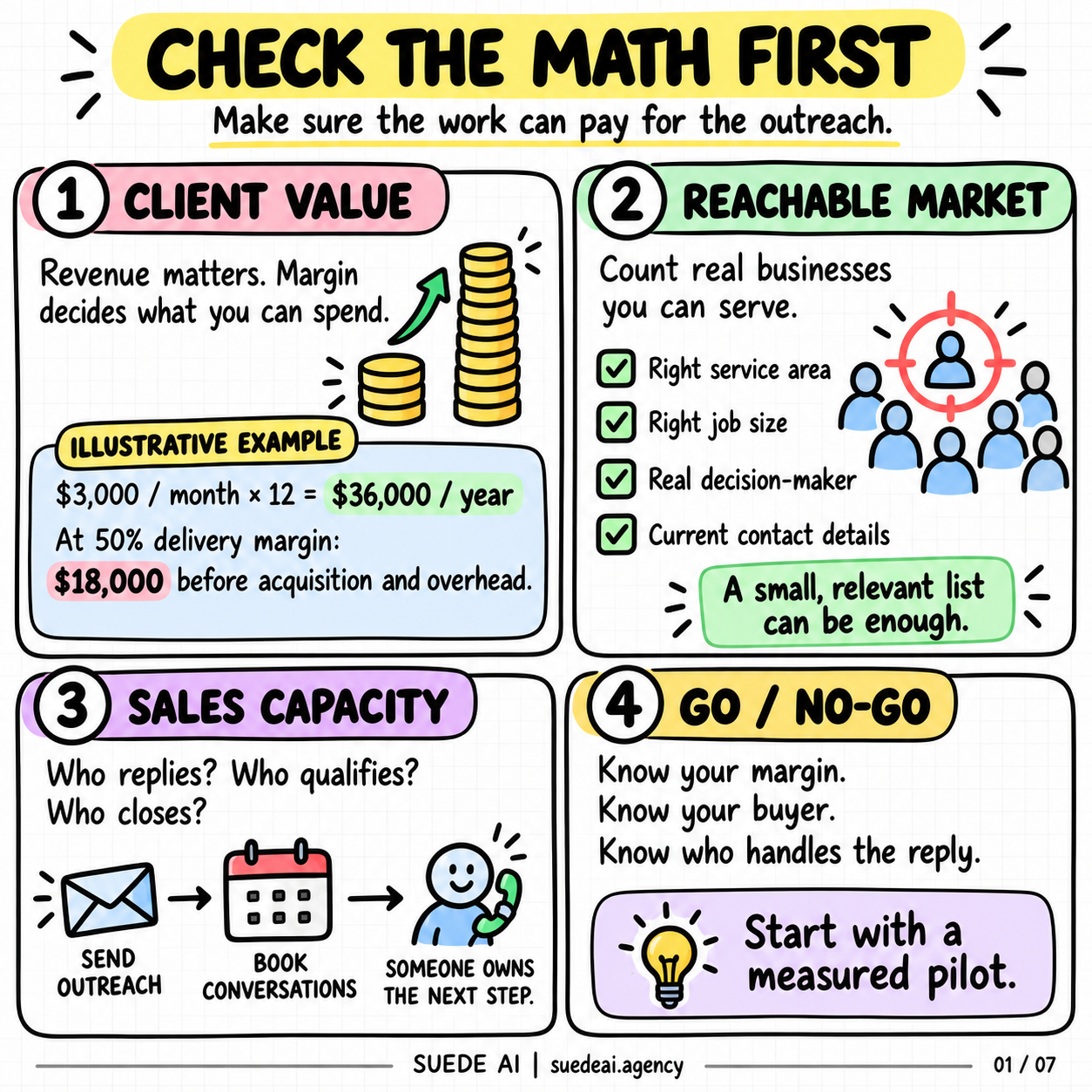
Start with what a customer is worth after you do the work.
Take an illustrative contract at $3,000 per month. Twelve paid months produce $36,000 in revenue. At a 50% delivery margin, that leaves $18,000 before acquisition costs and overhead. It does not mean you have $18,000 to spend winning the account.
You still need room for overhead, mistakes, delayed payment, and profit. If the contract can end early, a twelve-month projection may overstate what you will actually collect.
Count the costs people leave out: research time, data, software, mailbox administration, responding to prospects, sales calls, proposals, and the owner's attention. A campaign with cheap software can still be expensive to run.
Next, count businesses you can realistically serve. A commercial landscaper's market depends on location, property type, crew capacity, equipment, and job size. A giant national contact list tells you very little about those constraints.
Finally, check capacity. Who handles interested replies, attends site visits, and delivers new work? A small, relevant market can support careful outreach when the business can follow through.
The decision is straightforward: proceed when the economics, reachable buyers, and delivery capacity make sense together. If one is missing, fix it before adding volume.
For a Studio-led pilot, put those limits into the working brief: service area, minimum job size, available capacity, budget, and reply owner. That gives the lead-handling workflow a useful definition of fit. Review the brief with the business owner before connecting more inquiries to the CRM.
02. Give the buyer a concrete first step
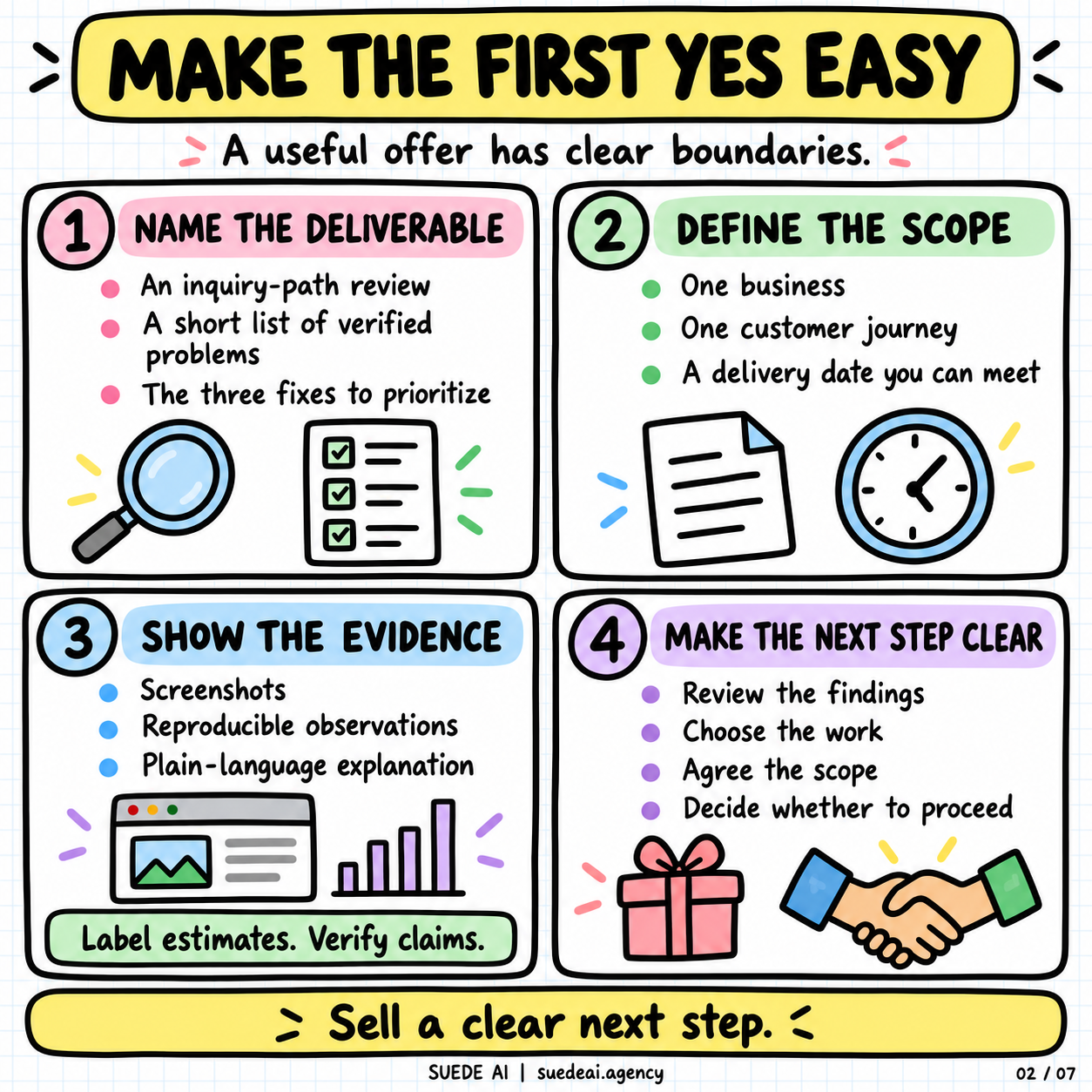
Describe the deliverable, the boundaries, and what happens afterward.
For Suede, an example offer is: "I'll review how a property manager finds your commercial services and requests a quote, then send the three fixes I'd prioritize."
Keep the scope small enough to finish properly. One business. One customer journey. A delivery date you can meet. Avoid turning a simple review into an unpaid rebuild because the original offer had no boundaries.
The same principle works for other services. A painter could offer a defined site walkthrough and phased scope. An IT provider could offer a limited backup-recovery review. A consultant could examine one handoff that regularly stalls delivery.
Decide what proof you will provide. A screenshot can show a confusing page. A reproduced test can establish a broken interaction. A before-and-after example can explain the proposed change.
Keep observations separate from estimates. "The form did not submit in this test" is evidence. "This costs you $20,000 a month" requires data you probably do not have from looking at a website.
Define the commercial next step too. After the review, the owner can choose whether to discuss implementation, ask for a scoped proposal, or use the findings independently.
Use Suede Agent Studio to connect the audit to the fix. For our landscaper, the review might identify a confusing commercial-services page, an inquiry form with missing details, or a quote request with no assigned owner. Present the evidence and proposed work in the client view, agree the scope, then test the repaired path from inquiry to handoff.
03. Research the account before writing to the person
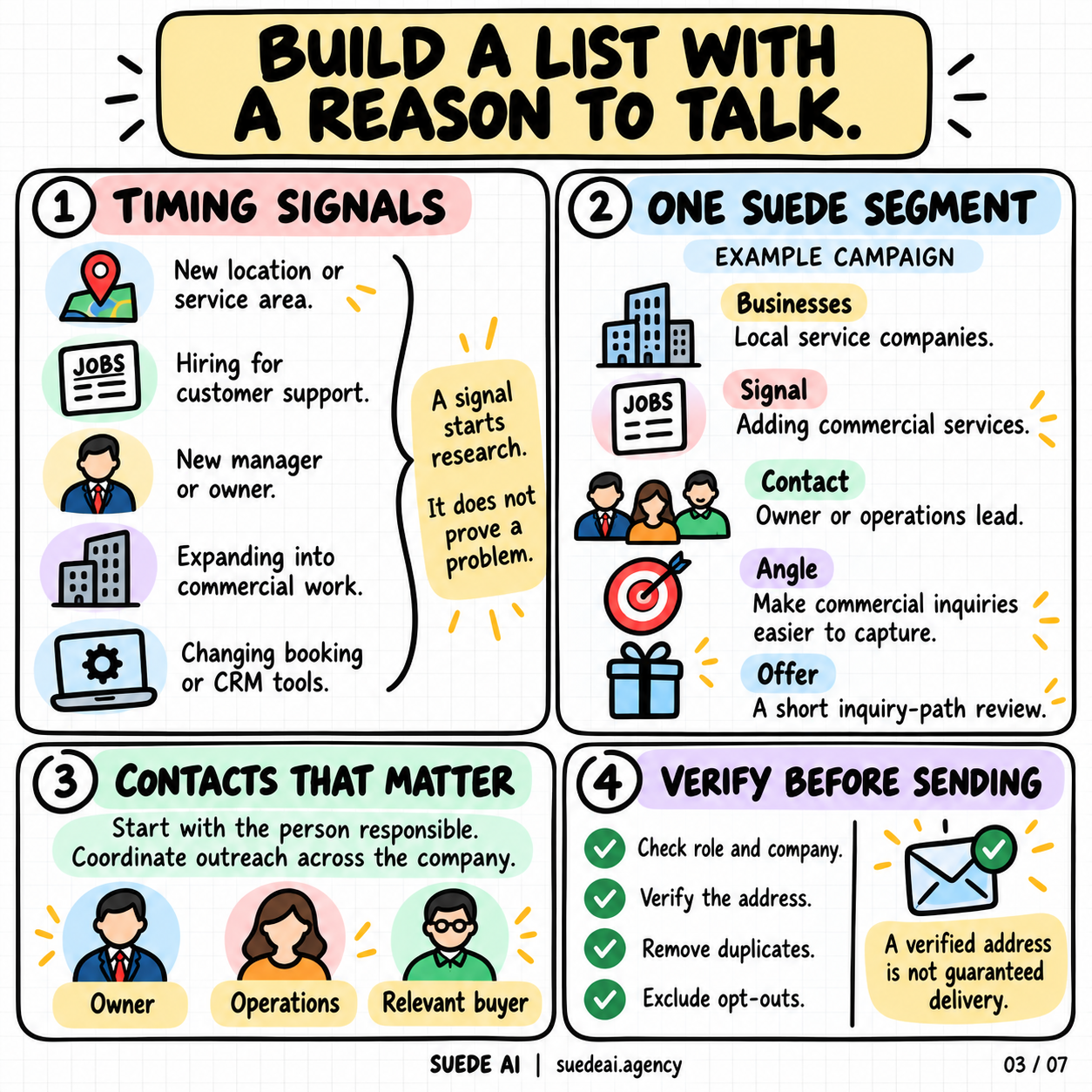
Build a record for each company that answers a simple question: why is this conversation relevant now?
A new location, a new service, a change in leadership, or a hiring announcement can give you a reason to investigate. None proves the company has the problem you sell a solution for.
For the landscaping example, a public announcement about commercial expansion is the observation. The hypothesis is that the business may need a clearer path for property managers to inquire. Review the site before deciding what to say.
The campaign brief can stay short: local service companies adding commercial work; owner or operations lead; inquiry-path review; one relevant message per account.
Record the source and date of each observation so the person handling replies has the context.
For a Studio workflow, make that source-based record the starting point for CRM handling: company, relevant contact, observation, source link, date, prior messages, and owner. Add the prospect's own answers as the conversation develops. The practical fix is continuity: whoever follows up can see why the outreach began and what has already been said.
Find the person responsible for the outcome. In a small business, that may be the owner. In a larger company, it could be operations, marketing, or the manager responsible for that location.
Coordinate contacts at the company level. Keep replies visible so teammates do not send competing pitches to the same account.
Check company identity, role, address, and prior contact history. Remove duplicates and suppress anyone who has opted out. Verification reduces uncertainty about an address; it does not guarantee delivery or interest.
Then review a sample manually. If you cannot explain why the first twenty companies belong in the campaign, a larger list will only make the mistake harder to inspect.
04. Make the sending setup accountable
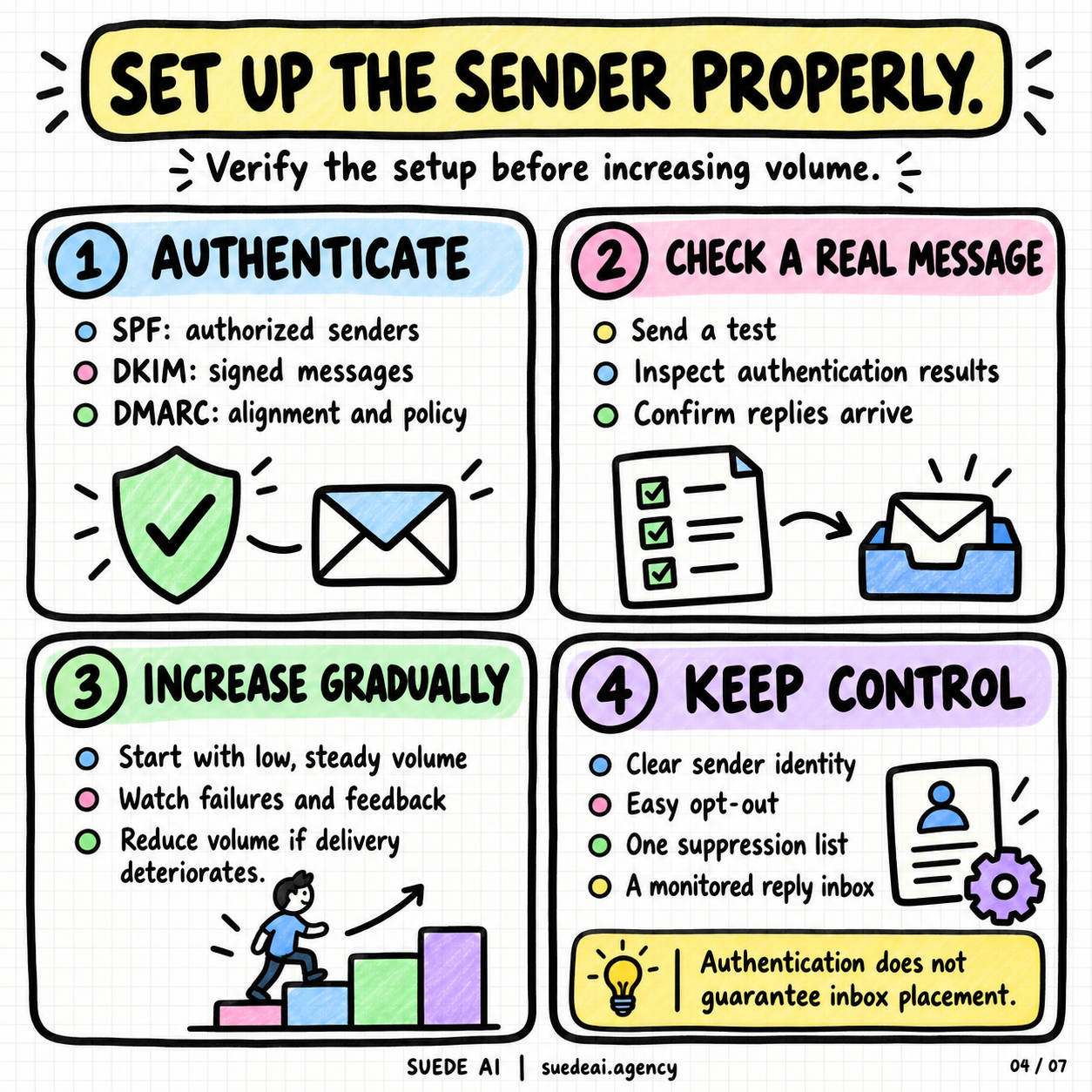
Treat each sending mailbox as a business asset with an owner, a purpose, and a monitored reply path.
Set up SPF, DKIM, and DMARC for the sending domains. SPF identifies authorized senders; DKIM signs messages; DMARC evaluates alignment and publishes a policy. Verify the results on a real delivered test message, not just in a setup screen. Google's sender guidance recommends all three authentication methods. [1]
Check reply routing as carefully as outbound delivery. Reply to the test message. Confirm it reaches the person or shared inbox that owns the conversation. A successful send with an abandoned reply address is an unfinished setup.
Include the Studio lead-handling workflow in that test. Use a test inquiry to check the CRM record, the assigned owner, and the next-action reminder. Then test a booking request and an opt-out. Fix a missed handoff before launch, while keeping mailbox authentication and delivery checks with the people responsible for the sending setup.
Use a clear sender name and business identity. Document every service authorized to send on your behalf.
Start with low, consistent volume and increase gradually while watching delivery failures and recipient feedback. Reduce volume when delivery deteriorates. Authentication and a warmup schedule do not guarantee inbox placement. Google's guidance also discourages unwanted mail and requires appropriate unsubscribe handling. [1]
Keep one suppression list across campaigns. An opt-out should survive a new spreadsheet, a different mailbox, a staff change, and a later campaign.
Before launch, test the message formatting, links, and opt-out path.
Give someone responsibility for reviewing failures. A campaign should have a clear pause condition and a person who can act on it. Buying more mailboxes does not explain why the existing ones are failing.
05. Write a message the buyer can evaluate quickly
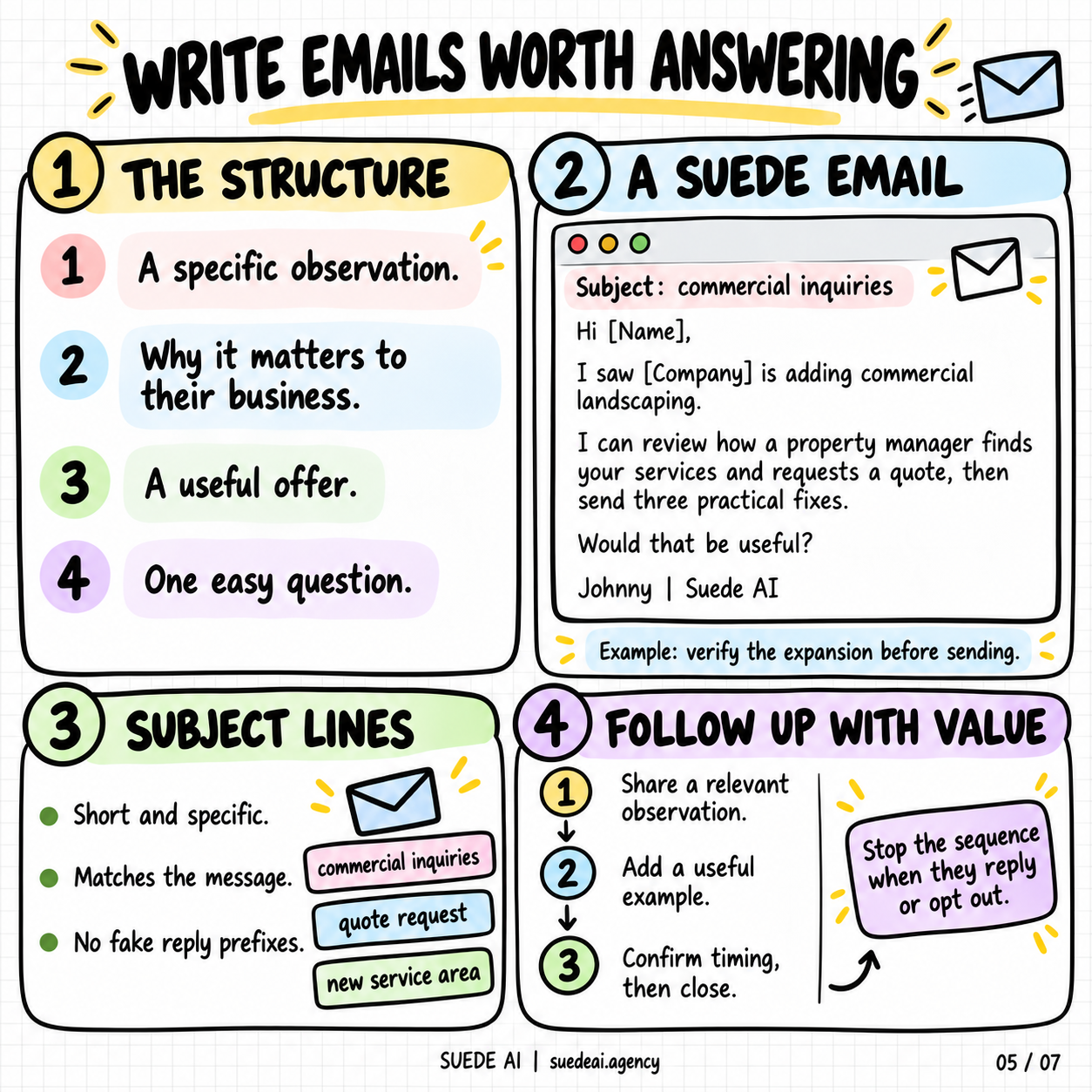
The email needs enough context for the recipient to understand the relevance and enough clarity to answer.
Use a specific observation, explain its connection to the work, make a useful offer, and ask one straightforward question. Keep the first message short enough to read without opening a separate document.
Here is an example for a verified commercial-services expansion:
Subject: commercial inquiries
Hi [Name],
I saw [Company] is adding commercial landscaping.
I can review how a property manager finds your services and requests a quote, then send three practical fixes.
Would that be useful?
Johnny | Suede AI
Send that opening only when the expansion is real. If the observation changes, the message should change with it.
A subject line should describe the actual conversation. "Commercial inquiries," "quote request," or "new service area" can work when the body genuinely concerns that topic. Avoid fake reply prefixes or wording that pretends an existing relationship.
Before sending, check the research and merge fields in several complete messages. Personalization should clarify why the offer matters.
Plan follow-ups around useful additions. One can share a specific observation. Another can explain what the review covers or show an appropriate example. A final message can establish timing and close the sequence.
In Suede Agent Studio, use the account context to guide messaging and follow-up. Have a person review the observation, offer, and proposed next step before sending. Record the approved message with the lead. When the prospect asks for a later conversation, make the requested date the follow-up plan instead of continuing a generic sequence.
Use proof you can show. Label demonstrations clearly and attribute client results accurately.
Stop the automated sequence when someone replies. Read the response before deciding the next action.
06. Treat a reply as the start of the work
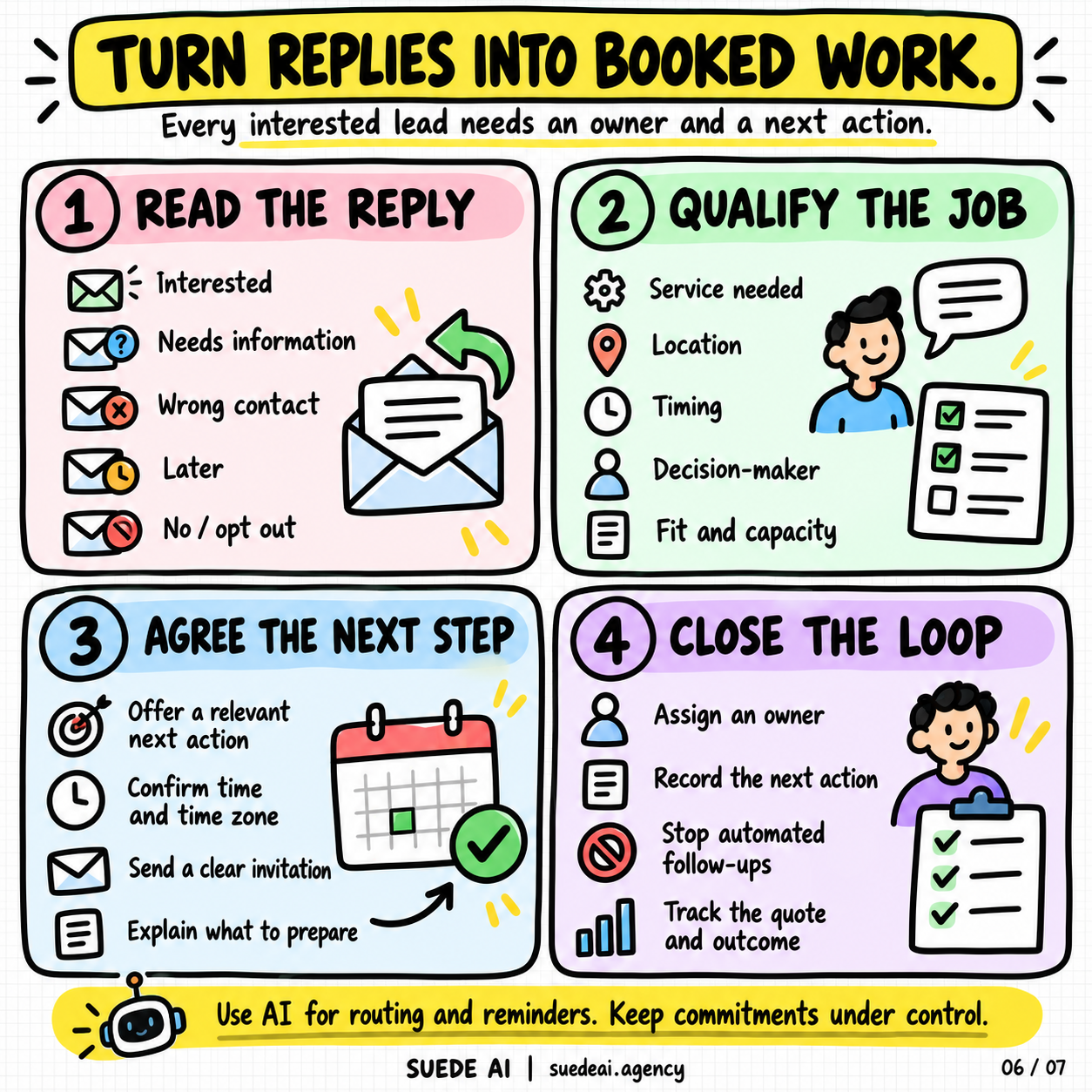
Assign a named owner and a backup. Set response expectations that match the team's actual coverage. If someone replies outside working hours, an acknowledgment can explain when to expect a substantive response.
Separate replies by what they require. Interest needs qualification or scheduling. A request for information needs an answer. A wrong-contact reply needs careful routing. "Later" needs a date. A refusal or opt-out needs a stop.
Qualification should establish whether the work fits. For a commercial service, that may mean location, property type, scope, timing, purchasing authority, and delivery capacity. Ask enough to choose the next step without turning the exchange into an interrogation.
For the Suede review offer, an interested reply might lead to:
Thanks, [Name]. Which commercial service are you most focused on growing, and should I review the existing website or a new page you are preparing?
That answer helps define the work. It is more useful than automatically sending everyone a generic booking link.
For meetings, confirm the time zone, purpose, and anything the buyer needs to prepare.
Use AI to summarize threads, draft replies, route leads, and create reminders. Define which actions can run automatically and which commitments need a person.
Pricing exceptions, contractual promises, and unusual delivery requests deserve clear ownership. Keep a record of what the system sent and why, so a human can pick up the conversation without making the prospect repeat everything.
After a call, record the decision, next action, responsible person, and due date. If a quote was promised, track whether it was sent. If the buyer requested a later discussion, keep the requested date.
This is the handoff Suede Agent Studio is meant to help organize. Build the workflow so a captured inquiry has a CRM owner, a reviewed response, and a next action. For the landscaper, that could be confirming the property details, arranging a site visit, and assigning the quote follow-up. Keep the thread and booking details with the record, and make the agreed work visible in the client view. A person still owns the promise.
07. Measure the path through to collected revenue
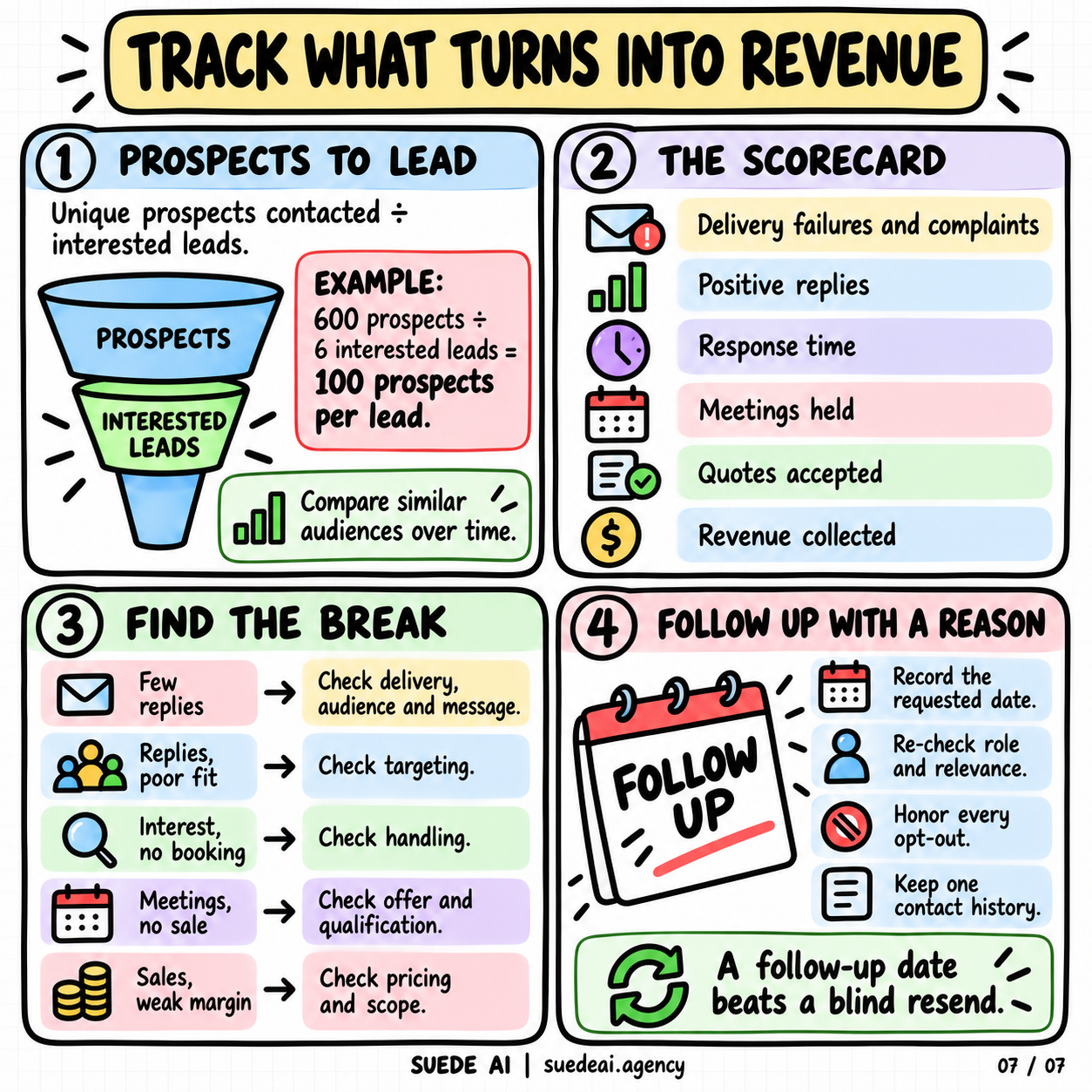
Use one record to follow an opportunity from first contact to outcome. Track the campaign, company, contact, meaningful reply, qualification, appointment, proposal, decision, and payment.
Keep the definitions explicit. An automatic response is not an interested lead. A booked meeting is not a held meeting. An accepted proposal is not collected revenue.
Prospects per interested lead is one useful efficiency measure. Divide unique prospects contacted by interested leads. An illustrative campaign with 600 prospects and six interested leads produces 100 prospects per interested lead. Count each prospect once, even if they received follow-ups.
Compare similar campaigns over comparable periods. A broad audience and a tightly researched local segment are doing different work. Report the counts alongside the rates so a tiny sample does not look more conclusive than it is.
Use the pattern to decide what to inspect. Few replies can justify checking delivery, audience, timing, and message. Responses from unsuitable buyers point toward targeting. Interest without a next step calls for a review of handling and scheduling. Meetings without sales justify examining fit, scope, proof, and price.
Read actual conversations before deciding what failed. Track the full acquisition cost and allow for the time between first contact and payment.
Review the system weekly with three questions: where are suitable opportunities stopping, what evidence explains that, and what single change will we test next?
Use the Studio client view and CRM records to make that review concrete. Bring the reply history, booking outcome, quote status, and confirmed payment information into the discussion. If interested leads have no owner, fix assignment. If qualified buyers never reach a meeting, inspect scheduling. Turn the finding into a scoped fix, then check the same handoff again.
For future follow-up, preserve context. Record the requested date, recheck the role, and confirm the offer is still relevant. Never treat an old contact list as permission to restart every conversation.
Questions about fixing cold-email follow-up
How does Suede AI improve cold-email follow-up?
Suede AI's approach to cold-email follow-up is to give every interested lead a named owner, a next action, and a due date. In a Suede Agent Studio workflow, keep the account context and approved messaging with the CRM record. Follow up with a relevant observation or agreed next step, and stop the sequence when someone replies or opts out.
How does Suede Agent Studio turn replies into booked work?
Suede Agent Studio connects reply handling with CRM ownership, qualification, messaging, and booking. Start by recording what the prospect needs, where the work is, and when they need it. Assign a person to review the response and confirm the next step. Keep meeting details, quote follow-up, and the outcome with the same lead record.
What is the Suede Studio protocol?
The Suede Studio protocol is the seven-stage working method in this guide: check the economics, define the offer, research the account, test the sending setup, write relevant messages, handle replies, and measure outcomes. Apply it through Suede Agent Studio by turning audit findings into scoped fixes, visible client work, and owned next actions.
What should a business fix before scaling outbound email?
Before scaling outbound email, a business should fix weak targeting, an unclear offer, untested reply routing, and leads without an owner. Check mailbox authentication, inquiry capture, CRM assignment, booking, and opt-out handling. Suede AI's approach is to audit that journey, agree the repairs, and test a bounded pilot against delivery capacity and real opportunity outcomes.
Put the Suede Studio protocol into operation
Start with one service, one buyer group, and one defined offer. Assign the person who owns replies before launching. Test the sending setup and the customer journey. Then run a bounded pilot with a budget and review date.
At review, read the responses, inspect the costs, and follow the opportunities. Keep what produced suitable conversations. Repair the specific failures. Expand only when the team can handle the resulting work.
For Suede, the promise should be concrete: identify friction, explain the fix, agree the scope, and make the workflow visible to the business owner. Suede Agent Studio gives that method a practical starting point: audit the journey, prioritize the repairs, and organize the lead-handling work around a clear owner and next action.
That is how I want the work evaluated.
Someone expressed interest. Someone followed through. The business delivered. The customer paid.
Johnny Suede
Explore Suede Agent Studio at suedeai.app. For help auditing and fixing the path from first inquiry to booked work, visit suedeai.agency.
Source note: Original Suede editorial treatment developed from the supplied infographic topics and the outbound theme in Will Breton's guide. The examples above are illustrative, not claims about Suede client results.
[1] Google: Email sender guidelines, checked October 26, 2026. Provider guidance informs the sender-setup section; campaign economics and workflows are planning recommendations.